Preschool Learning App Without Screen-Time Guilt
.webp)
A good preschool learning app should make screen time feel intentional: short games, real early-learning skills, voice guidance for non-readers, visible progress for parents, and a motivation system that brings kids back without pressure. For children ages 3-10, the best app is not the loudest or busiest one. It is the one that helps a child practice letters, numbers, memory, colors, tracing, and listening in small, repeatable moments.
If you have ever handed your child a phone and then wondered, Is this actually helping?, you are not alone. Parents search for a preschool learning app because they want screen time to count. They want something calmer than endless videos, more useful than random tapping, and simple enough for a young child to use without constant help.
The challenge is that many apps call themselves educational. Some are built around real skills. Others are mostly entertainment with alphabet stickers on top. This guide shows what to look for, what to avoid, and why PIXEL-LEARN was built around voice guidance, short games, parent progress, and a digital pet reward loop.
What Parents Really Want From a Preschool Learning App
The search for a preschool learning app is rarely just about apps. It is about trust. Parents want to know that a few minutes of screen time can support learning instead of replacing play, conversation, books, and real-world practice.
That is why the strongest preschool apps usually answer four parent questions:
- Is my child practicing a real skill? Letters, numbers, matching, memory, colors, directions, tracing, or listening.
- Can my child use it independently? Voice guidance matters because many preschoolers cannot read instructions.
- Will it stay calm and focused? Short activities beat overstimulating screens and endless loops.
- Can I see what happened? Progress tracking helps parents understand whether the app is useful.
What Makes a Preschool Learning App Actually Educational?
An educational app should do more than keep a child busy. It should ask the child to think, listen, compare, remember, choose, speak, count, trace, or solve. For preschoolers, that usually means simple activities with immediate feedback and a clear learning goal.
1. Voice guidance for children who cannot read yet
Most children ages 3-5 are still developing early literacy. If an app depends on written instructions, the child may need an adult beside them the whole time. Voice-guided learning apps remove that barrier by saying the task out loud: tap the letter, count the objects, find the color, trace the shape, or choose the correct answer.
2. Short games with one clear skill
Preschoolers learn best in small, repeatable moments. A strong preschool learning app keeps activities short and focused. One game might practice recognizing the letter B. Another might practice counting to five. Another might build memory with matching cards. The child knows what to do, finishes quickly, and gets a small success.
3. Real progression, not random activities
Look for an app that moves from easier tasks to harder ones. A child should not jump from basic counting to confusing math too fast. Good progression protects confidence. It lets kids feel, I can do this, while still nudging them forward.
4. Rewards that support learning habits
Rewards can be helpful when they connect back to practice. In PIXEL-LEARN, children earn coins through learning games and use them to care for a digital pet. That gives kids a reason to return, but the reward still begins with practicing a skill.
5. Parent progress visibility
Parents should not have to guess whether an app is working. Progress screens, completed levels, and activity signals help parents see what their child practiced. They also make it easier to praise effort: "You finished three number games today" is more useful than "Good job on the tablet."
Preschool Learning App Checklist
Before downloading any preschool learning app, scan for these features:
- Voice instructions for every activity
- Short sessions that fit young attention spans
- Practice for letters, numbers, memory, colors, tracing, and directions
- No disruptive ads in the child experience
- Clear parent progress or level tracking
- A positive reward system that builds consistency
- Simple navigation for small hands
- Skills that connect to preschool and kindergarten readiness
How PIXEL-LEARN Fits This Checklist
PIXEL-LEARN is a free preschool learning app for kids ages 3-10. It is designed around short, voice-guided games that help children practice letters, numbers, memory, matching, colors, directions, prepositions, tracing, and early school-readiness skills.
The app also includes a digital pet system. Kids earn coins by playing learning games, then use those coins to feed, care for, and play with their pet. This turns practice into a routine without making the learning feel heavy.
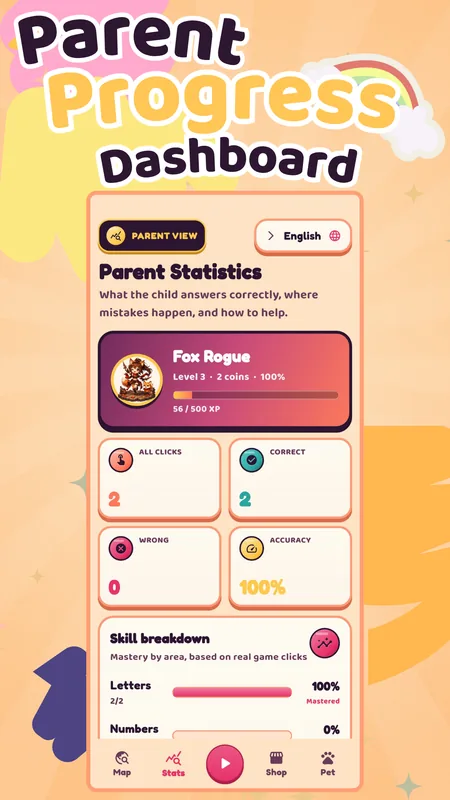
For parents, the progress dashboard helps show what the child has done. That matters because many parents do not just want an app that looks educational. They want evidence that their child is practicing something specific.
Is a Preschool Learning App Better Than Videos?
It depends on the app and the video. Passive watching can be relaxing, but it usually asks less from the child. Interactive learning apps can ask children to make choices, repeat sounds, match pictures, trace lines, count objects, and remember patterns.
That interaction is the difference parents should look for. If a child is only watching, the experience is closer to entertainment. If the child is responding, practicing, and getting feedback, the screen time has more learning potential.
Best For: Which Families Should Try PIXEL-LEARN?
PIXEL-LEARN is a good fit for families who want a simple, free, game-based learning app rather than a large subscription curriculum. It is especially useful when:
- Your child is 3-10 and still learning letters, numbers, colors, or early memory skills.
- Your child cannot read written instructions yet and needs voice support.
- You want quick activities instead of long lessons.
- Your child responds well to characters, coins, pets, and gentle rewards.
- You want to see progress instead of guessing what happened during screen time.
What To Avoid In Preschool Apps
Some apps look polished but are not ideal for young children. Be careful with apps that use constant interruptions, unclear instructions, heavy ads, or rewards that are disconnected from learning. Also watch for apps that keep children inside the app for too long without natural stopping points.
A preschool learning app should help your child finish a small task and feel successful. It should not make it hard to stop.
Quick Parent Decision Guide
- If your child cannot read yet: prioritize voice guidance.
- If your child loses focus quickly: choose short games, not long lessons.
- If you worry about screen-time guilt: look for real skills and parent progress.
- If your child needs motivation: choose meaningful rewards, like caring for a digital pet.
- If you want kindergarten readiness: choose letters, numbers, memory, tracing, colors, and listening practice.
FAQ: Preschool Learning Apps
What is a preschool learning app?
A preschool learning app is an app that helps young children practice early skills such as letters, numbers, memory, colors, tracing, directions, listening, and school readiness through age-appropriate activities.
What makes a preschool learning app educational?
It should teach a specific skill, give clear instructions, include interaction, provide feedback, and help parents understand progress. Bright colors alone do not make an app educational.
Why is voice guidance important?
Voice guidance helps preschoolers who cannot read yet. It lets the app explain each task out loud, so children can understand what to do with less adult help.
Can a free preschool learning app be enough?
Yes, if it includes focused skill practice, safe design, clear audio, and enough variety to keep a child practicing. Free does not have to mean low quality.
How long should preschoolers use a learning app?
Short sessions are usually best. Many families start with 5-10 minutes, then connect the same skill to offline play, reading, drawing, counting, or conversation.
What age is PIXEL-LEARN for?
PIXEL-LEARN is designed for kids ages 3-10 who are practicing early learning skills, including preschool and kindergarten readiness.
Try PIXEL-LEARN Free
500+ learning levels, a digital pet reward loop, parent progress, and voice guidance for kids ages 3-10.
Download PIXEL-LEARN Free on Google Play