Free Apps for Non-Verbal Autism: Communication and Learning
Parents of non-speaking children usually need two different kinds of free apps — and mixing them up leads to frustration. Communication (AAC) apps give your child a voice: picture boards the child taps and the device speaks aloud. Learning apps teach letters, numbers, and early skills — and for a non-verbal child they only work if the app itself talks and never requires the child to read or speak. This guide explains both categories and how to combine them.
Communication Apps vs Learning Apps: The Key Difference
| AAC / Communication Apps | Voice-Guided Learning Apps | |
|---|---|---|
| Job | Let the child express needs, choices, and feelings | Teach letters, numbers, memory, colors, tracing |
| Who talks | The child "speaks" through the app | The app speaks to the child |
| When used | All day, whenever the child wants to say something | Short daily learning block (15–20 minutes) |
| How to choose | With a speech-language therapist — vocabulary must fit the child | Test yourself: full voice guidance, tap-only interaction, calm design, no ads mid-game |
Free Communication (AAC) Apps: What to Know
AAC stands for Augmentative and Alternative Communication. AAC apps show a grid of pictures — "eat", "drink", "play", "more", "stop" — and speak each word when the child taps it. Research consistently shows AAC use supports, not delays, speech development.
- Free options exist. Open-source AAC apps for Android and the web offer symbol boards and text-to-speech at no cost — a realistic starting point before committing to expensive premium AAC software.
- Setup matters more than the app. The board must contain the words your child needs, at a grid size your child can handle. This is why AAC selection should be done with a speech-language therapist.
- The device should always be available. An AAC app locked away in a drawer teaches the child that their voice is optional.
Learning Without Speaking: How a Non-Verbal Child Practices Letters and Numbers
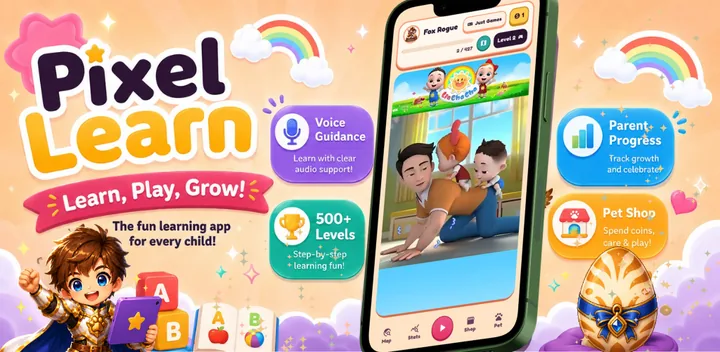
Many non-speaking children understand far more language than they can produce. That means a well-designed learning app can work fully — as long as it never demands reading or speech. This is exactly how PIXEL-LEARN is built:
- The app speaks every instruction — "Tap the letter A", "Find three apples" — in English, Hebrew, Russian, or Arabic. The child never needs to read.
- Every answer is a tap — no speech recognition, no typing, no verbal response required at any level.
- Audio-visual pairing builds receptive language — the child hears "blue" while seeing and touching blue, hundreds of times across 500+ levels.
- Coins and the digital pet replace verbal praise — the reward is visual and concrete: earn coins, feed the pet, decorate its room.
- The parent progress screen speaks for the child — you can see exactly which skills your child practiced and mastered, even if they can't tell you about it. That data is also useful to share with speech and occupational therapists.
A Realistic Free App Setup for a Non-Verbal Child
- AAC app — available on the tablet/phone all day for communication (chosen with your therapist).
- PIXEL-LEARN — one short daily learning block: 3–5 voice-guided games, then pet care. Free on Google Play, ages 3–10.
- Keep them separate. Communication is not a reward and should never be gated behind learning tasks. Learning time is its own routine, communication is always on.
What to Avoid
- Apps that require the child to repeat words aloud to progress — an instant wall for non-speaking children.
- Apps with text-only instructions — if the child can't read yet, they're locked out.
- Mid-game ads — a random ad breaks the routine and can end the session in distress.
- Timed challenges and failure sounds — pressure and punishment shut down engagement fast.
Frequently Asked Questions
Learning Without Reading or Speaking
Every PIXEL-LEARN game is voice-guided and tap-based — built so pre-readers and non-speaking kids can learn independently. Free on Google Play.
▶ Download PIXEL-LEARN Free